Design a School Admission Facebook Cover Banner That Converts
Every September, the digital landscape becomes a battlefield for attention. Schools, colleges, and educational institutions are vying for the same pool of prospective students and anxious parents. While you might have the best curriculum in the district, if your digital storefront—specifically your social media presence—looks unprofessional or outdated, you risk losing potential applicants before they even read a single testimonial. The Facebook cover photo is often the first visual handshake an institution offers. It sits at the top of the page, prime real estate that sets the tone for your entire brand narrative. Getting this right isn't just about aesthetics; it is about establishing immediate trust and authority in a competitive market.
The Anatomy of a High-Converting Enrollment Visual
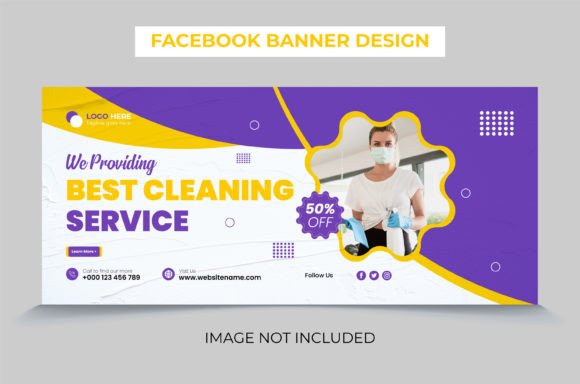
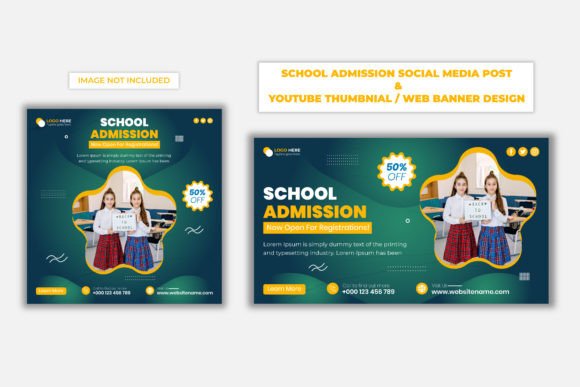
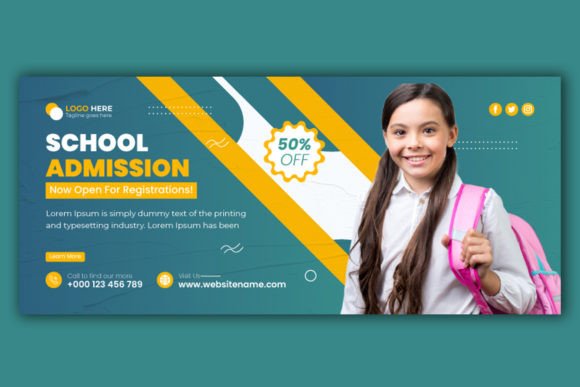
When designing a School Admission Facebook Cover Banner, you aren't just arranging pixels; you are crafting a strategic marketing asset. The visual appeal of these designs often relies on a delicate balance between energetic youthfulness and institutional reliability. You need imagery that suggests growth, safety, and academic excellence. This is where premium design assets come into play. A generic template often falls flat, but a professionally crafted banner design utilizes specific design features to ensure the message lands effectively.
For the designer or marketing manager tasked with this project, the technical specifications matter just as much as the creative concept. A design that looks crisp on a laptop but blurry on a mobile phone is a failure. This is why high-resolution assets are non-negotiable. When working with professional files, you should look for assets that are built at 300 DPI in RGB color mode. While 72 DPI is standard for web, having a 300 DPI master file ensures that if you decide to repurpose that design for a printed flyer, a brochure handed out at open houses, or a poster for local community boards, the image remains sharp and professional.
Streamlining the Creative Workflow
Time is a luxury that most educators and small business owners do not have. The admission season is frantic, and waiting days for a designer to concept a banner from scratch can be costly. This is the value of a well-structured design file, such as a customizable AI or EPS file. These formats allow for immediate modification. If your school changes its opening date, or if you want to swap out a color to match a specific campaign theme, you can do so in minutes rather than hours.
Consider the user experience of the designer. A file that is "competitor with Adobe Illustrator CC" means you are working with industry-standard software, ensuring compatibility and stability. There is nothing more frustrating than receiving a file that corrupts or loses its layers because it was saved in an outdated format. Furthermore, the inclusion of a help file with font download links is a small but critical detail. Typography is the voice of your design. If a parent opens your page and sees generic, default system fonts, it signals a lack of effort. However, if they see a carefully selected serif font paired with a clean sans-serif font, it conveys modernity and attention to detail—qualities every parent wants in an educational institution.
Beyond the Banner: Creating Visual Consistency
The utility of a high-quality School Admission Facebook Cover Banner design extends far beyond the top of your Facebook page. In the world of branding, consistency is king. The visual language established in your cover photo should dictate the look and feel of your entire admission campaign. This is where having versatile design assets becomes invaluable.
Think about the various touchpoints a prospective family interacts with. They might see your Facebook ad, then visit your website, download a PDF brochure, and finally receive an email newsletter. If the visual style of your Facebook banner—perhaps featuring a specific geometric overlay, a unique color palette, or a distinct typography style—isn't mirrored across these other platforms, your brand feels disjointed.
With an editable vector file, you can easily extract design elements to create:
- Social Media Graphics: Use the same header style for Instagram Stories or LinkedIn banners to maintain a cohesive digital identity.
- Print Materials: Adapt the layout for A4 enrollment forms or large-scale event posters.
- Merchandise: If you are designing welcome kits for new students, the graphic elements from the banner can be repurposed for tote bags, notebooks, or t-shirts.
- Digital Products: Create a consistent look for e-books, digital brochures, or Zoom backgrounds for virtual open houses.
Typography That Speaks to Parents and Students
The choice of typeface in an educational setting is a nuanced decision. You are speaking to two distinct audiences: the students, who want to feel excited and engaged, and the parents, who are looking for structure, safety, and academic rigor. A "one-size-fits-all" font rarely works.
When customizing your banner, pay attention to the hierarchy of information. The headline—usually "Admissions Open" or "Enroll Now"—needs to be bold and commanding. This is where a strong display font or a modern sans-serif typeface shines. It grabs attention instantly. However, the details—dates, contact information, website URLs—need to be highly legible. This is where a clean, readable body font comes in.
Avoid the temptation to use overly "fancy" script fonts for essential information. While a handwritten font might look charming, it can be difficult to read at smaller sizes, especially on mobile devices where screen real estate is limited. Instead, use script fonts sparingly for accents or sub-headers, and stick to clean sans-serif fonts for the critical data. This ensures your message is accessible to everyone, regardless of how they are viewing your page.
Practical Tips for Customization and Brand Identity
Once you have your AI or EPS file open, the real creative work begins. Here are some practical observations to help you maximize the impact of your banner:
- Color Psychology: The RGB color mode is standard for screens, but colors behave differently digitally than they do in print. Blues and greens often evoke feelings of trust, calm, and growth—perfect for educational environments. Reds and oranges can be used for accents to create a sense of urgency regarding application deadlines. Ensure your color choices align with your school's existing brand guidelines.
- Image Selection: Since images are often not included in these types of design files, you have the freedom to insert photos of your actual campus and students. This is a massive advantage. Stock photos can feel generic and "fake." Authentic photos of your facilities and happy students build genuine connection and trust.
- Whitespace Management: A cluttered banner is an ignored banner. Parents are busy. They need to scan your page and get the information in seconds. Ensure your design leaves enough "breathing room" (whitespace) around the text. If the background image is too busy, consider adding a semi-transparent overlay or a solid shape behind the text to make it pop.
- Mobile Optimization: Always check how your banner looks on a mobile device. Facebook crops the sides of the cover photo on mobile. Ensure your main message and call-to-action are centered in the middle 60% of the image so they aren't cut off on smaller screens.
Maximizing Your Marketing Assets
Investing in a professional School Admission Facebook Cover Banner template is not just a purchase; it is an investment in your marketing infrastructure. By securing a file that is easy to customize and technically robust, you empower your team to react quickly to market changes. Whether you need to announce a sudden extension of the admission deadline, promote a new scholarship program, or highlight a specific department, having a flexible template ensures you can launch campaigns rapidly without sacrificing quality.
Ultimately, the goal is to remove friction from the admission process. A visually stunning, professional, and clear banner tells prospective families that your institution is organized, modern, and ready to welcome them. It transforms a simple social media page into a powerful conversion tool, bridging the gap between a casual scroll and a submitted application. By focusing on high-quality design features, thoughtful typography, and strategic branding, you create a visual narrative that resonates with your community and drives results.