Minimal A5 Portfolio: A Multipurpose Template for Creative Professionals
As a designer or creative entrepreneur, your portfolio is often the first real handshake with a potential client. It's not just a collection of images; it's a curated story of your skills, your process, and your professional identity. Yet, starting that story from a blank page can feel daunting. You need a foundation that is both flexible and polished, allowing your work to shine without the template itself competing for attention. This is precisely where a thoughtfully constructed resource becomes invaluable, providing structure while leaving ample room for your unique voice.
More Than a Template: A Framework for Your Creative Narrative
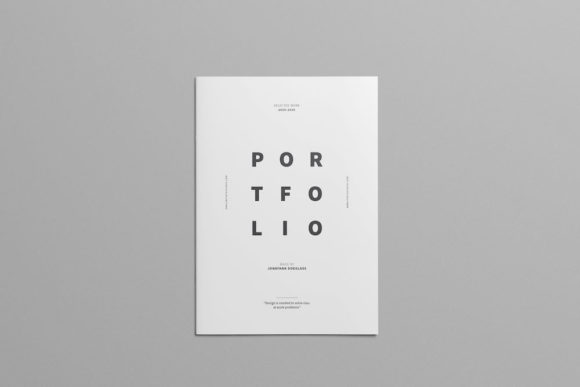
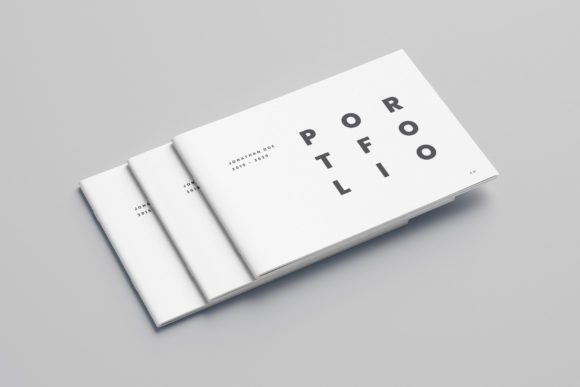
The Minimal A5 Portfolio template is designed to be that versatile foundation. At its core, it’s a 32-page Adobe InDesign file, built in the practical A5 size with a professional 3mm bleed, ensuring your final printed piece looks crisp and ready for the printer. But its value extends far beyond the technical specifications. The contemporary typography and clean, minimal design act as a neutral gallery wall. Whether you're a graphic designer showcasing brand identities, a photographer presenting a curated series, an illustrator displaying character concepts, or a web designer walking through a UX case study, the layout adapts to serve your narrative. The separated layers and paragraph styles mean you're not wrestling with the file; you're simply inserting your content. Every text block is editable, and designated spaces for your own photography or mockups make personalization straightforward.
Practical Applications Across Industries and Projects
The true test of any design asset is its real-world utility. This multipurpose portfolio template excels in bridging the gap between digital and print, serving a wide array of professional needs. Consider these scenarios:
- Client Pitches and Proposals: Compile your best work into a cohesive PDF or a beautifully printed booklet. The consistent layout across all 32 pages builds a compelling case for your expertise, moving logically from introduction to detailed project breakdowns.
- Brand Identity Packages: For designers, presenting a full brand system—logo, color palette, typography, and applications—in a unified document is crucial. The template’s structure allows you to dedicate pages to each element, creating a professional deliverable that clients can reference and share.
- Editorial and Lookbook Design: Photographers and artists can use the template to create stunning lookbooks or editorial-style portfolios. The ample image placeholders and clean text areas let your visuals take center stage, supported by minimal, readable copy.
- Digital Product Previews: If you sell digital assets like fonts, graphics, or templates, a portfolio-style PDF can serve as a sophisticated sales sheet or a detailed instruction guide, enhancing the perceived value of your product.
- Conference or Workshop Materials: Create a professional handout or speaker portfolio that outlines your talk, showcases relevant past work, and provides key takeaways in a format that attendees will actually keep.
The included file formats—INDD for Creative Cloud users and IDML for those on older CS4, CS5, or CS6 versions—ensure broad accessibility. Plus, the PDF preview allows anyone to view the template’s potential instantly, which is perfect for sharing ideas with collaborators or clients who may not have design software.
Enhancing Professional Presentation and Brand Consistency
Using a unified template like this does more than just save time; it actively strengthens your professional image. Visual consistency is a cornerstone of strong brand recognition. When a client encounters the same thoughtful layout, typography, and spacing across your proposal, your website, and your social media graphics, it builds subconscious trust and familiarity. The minimalist design ensures that consistency never feels monotonous—it provides a reliable frame that makes the diversity of your work within it even more impactful.
Readability is another critical factor the template addresses. The chosen typefaces, Poppins and Roboto, are modern sans-serif fonts known for their clarity and versatility. Poppins, with its geometric forms, works beautifully for headlines, while Roboto’s friendly yet professional tone is ideal for body text. This pairing is a classic for a reason: it’s highly legible at various sizes, ensuring your project descriptions and case studies are easy to digest. You won’t be fighting the typography; it will work silently to present your words with clarity.
Tailoring the Template to Your Unique Brand Voice
While the template provides an excellent starting point, the final step is infusing it with your personality. Here’s how to approach customization thoughtfully:
- Align Typography with Your Brand: The provided fonts are a superb neutral starting point. If your own brand uses different typefaces, consider swapping them in. Maintain the hierarchical logic (e.g., using a bold weight for titles and a regular weight for body copy) to preserve the clean structure. If you’re building a brand from scratch, the Poppins/Roboto combination is a reliable, contemporary choice that won’t date quickly.
- Curate Your Content Ruthlessly: A 32-page portfolio is generous, but that doesn’t mean you must fill every page. Quality trumps quantity. Select 5-8 of your strongest projects and give them the space they deserve. Use the layout to tell a mini-story for each: the challenge, your process, and the final result.
- Test Your Final Output: Always export a test PDF and review it on different devices and in print if possible. Check that images are sharp, text is legible, and the color mode (the template uses print-ready CMYK) translates correctly if you’re sharing digitally. Ensure your personal photos and mockups integrate seamlessly with the template’s aesthetic.
- Consider the End Use: Will this primarily be a digital PDF sent via email, or a printed booklet left with clients? The A5 size is wonderfully portable for print, but if it’s digital-only, you might slightly adjust your image selection for screen viewing. The bleed is essential for print, but for digital, you can safely ignore it.
Remember, this is your professional narrative. The template is the stage, but you are the director and the lead. Use its clean lines and organized structure to amplify your voice, not replace it. By starting with a strong, adaptable foundation like the Minimal A5 Portfolio, you free up your creative energy to focus on what truly matters: telling the compelling story of your work and connecting with the clients and projects that inspire you.